Pricing.

Pricing.

Pricing.

Pricing.

Our service offers three plans—View, Link, and Maestro—to meet our customers’ diverse needs.
Each plan is designed to match customer size and required features.

Our service offers three pricing plans—Free, Pro, and Enterprise—to meet a variety of customer needs.
Each plan is designed according to customer scale and required features.

To meet the diverse needs of our customers,
we offer three pricing plans: View, Link, and Maestro.
Each plan is designed based on customer size and required features.

We will support your digital transformation.

We will support your digital transformation.

Plan comparison

WATON View
WATON Link
WATON Maestro
WATON View

$500 / month

Monthly subscription price

One free per project is for 1 floor, while the pro version is for 10 floors.

$500 / month

From $1,000 / month

From $2,000 / month

Monthly subscription price

One free per project is for 1 floor, while the pro version is for 10 floors.

$500 / month

Initial setup cost
Digital Twin Map Creation

per unit area

-

From $10,000

From $10,000

Digital Twin Map Creation

per unit area

-

Initial platform setup and registration

per session

-

$10,000 / 1 session

$10,000 / 1 session

Initial platform setup and registration

per session

-

Real-time DB integration (WMS, etc.), API integration

per session

-

$30,000 / 1 session

$30,000 / 1 session

Real-time DB integration (WMS, etc.), API integration

per session

-

Install AI Vision Kit

Per unit

-

-

$1,000 / unit

Install AI Vision Kit

Per unit

-

Digital warehouse development agency

One free per project is for 1 floor, while the pro version is for 10 floors.

$10,000

-

-

Digital warehouse development agency

One free per project is for 1 floor, while the pro version is for 10 floors.

$10,000

Recommended for

One free per project is for 1 floor, while the pro version is for 10 floors.

Start Digital Twin

System Integration Type

AI Real-Time Logistics Operations

Recommended for

One free per project is for 1 floor, while the pro version is for 10 floors.

Start Digital Twin

Build phase

One free per project is for 1 floor, while the pro version is for 10 floors.

Initial DT setup

DT Extension

DT Complete

Build phase

One free per project is for 1 floor, while the pro version is for 10 floors.

Initial DT setup

Key Features

One free per project is for 1 floor, while the pro version is for 10 floors.

Warehouse Visualization

API integration, object integration (Equipment such as DPS, PDA)

AI Integrated Platform (FLT, AGF, AMR, AGV)

Key Features

One free per project is for 1 floor, while the pro version is for 10 floors.

Warehouse Visualization

Cloud support - Watson
Project creation

One free per project is for 1 floor, while the pro version is for 10 floors.

1 item

10 items

Unlimited

Project creation

One free per project is for 1 floor, while the pro version is for 10 floors.

1 item

Twin Map

per workspace

1 item

10 items

Consultation

Twin Map

per workspace

1 item

Logistics information upload

4000 cell limit

30 per month

100 per month

Consultation

Logistics information upload

4000 cell limit

30 per month

Logistics Twin

Celltwin support (per case)

4,000 cells

10,000 cells

Consultation

Logistics Twin

Celltwin support (per case)

4,000 cells

Map Creation - Waton Studio
Map editing

Effortlessly upload files by dragging and dropping them into the storage interface.

Map editing

Effortlessly upload files by dragging and dropping them into the storage interface.

Logistics Center Design

Quickly find your files with our powerful in-app search functionality.

Logistics Center Design

Quickly find your files with our powerful in-app search functionality.

Asset Custom

Explore and manage your data assets, ensuring high-quality, and governed data accessibility.

-

Asset Custom

Explore and manage your data assets, ensuring high-quality, and governed data accessibility.

-

Logistics integration
Inventory and shipping data management

Fixed format and communication restrictions limit some support.

Some support

Inventory and shipping data management

Fixed format and communication restrictions limit some support.

Logistics data upload

Protect your data with robust encryption methods tailored to each plan.

Logistics data upload

Protect your data with robust encryption methods tailored to each plan.

Apply custom cell ID

Explore and manage your data assets, ensuring high quality and governed data accessibility.

Apply custom cell ID

Explore and manage your data assets, ensuring high quality and governed data accessibility.

Open API integration

Developer site support

-

Open API integration

Developer site support

-

Statistical analysis

The corporate type has customized support that reflects the requirements.

-

Statistical analysis

The corporate type has customized support that reflects the requirements.

-

Account Management

Admin account

1 account

10 accounts

Operating Council

Admin account

1 account

Member invitation

The largest file size you can upload in a single action.

3 accounts

10 accounts

Operating Council

Member invitation

The largest file size you can upload in a single action.

3 accounts

Solution Add-on

Autonomous forklift positioning

-

-

Autonomous forklift positioning

-

AI automated inbound and outbound logistics

-

Operating Council

AI automated inbound and outbound logistics

-

AI Logistics Stocktaking

-

Operating Council

AI Logistics Stocktaking

-

AI export and import management

Operating Council

AI export and import management

Integrated Facility Control

-

-

Integrated Facility Control

-

Technical support

Disability Response

Manage access with a specified number of user accounts per plan.

Disability Response

Manage access with a specified number of user accounts per plan.

1

Response time

Explore and manage your data assets, ensuring high quality and governed data accessibility.

48 hours

4 hours

Immediate response

Response time

Explore and manage your data assets, ensuring high quality and governed data accessibility.

48 hours

Custom cost

Add Asset

Asset

-

400,000 / each

400,000 / each

Add Asset

Asset

-

add floor

Application of physical structure

-

$ 10,000 / month

$ 10,000 / month

add floor

Application of physical structure

-

WATON Link

$ 100,000 / Month

Cloud support - Watson
S3 storage capacity

S3 DB capacity and total

3 GB

DB storage capacity

logistics data

10 GB

Project creation

One free per project is for 1 floor, while the pro version is for 10 floors.

10 pieces

Upload file

Explore and manage your data assets, ensuring high quality and governed data accessibility.

Map Creation - Waton Studio
Map editing

Effortlessly upload files by dragging and dropping them into the storage interface.

Logistics sensor design

Quickly find your files with our powerful in-app search functionality.

Asset Custom

Explore and manage your data assets, ensuring high quality and governed data accessibility.

Shortcut support

Explore and manage your data assets, ensuring high quality and governed data accessibility.

Statistical analysis

Explore and manage your data assets, ensuring high quality and governed data accessibility.

Logistics integration
Logistics data upload

Loading area ID rule application

Explore and manage your data assets, ensuring high quality and governed data accessibility.

API integration support

Explore and manage your data assets, ensuring high quality and governed data accessibility.

Account Management

Admin account

10 accounts

Member invitation

The largest file size you can upload in a single action.

10 accounts

Solution Add-on

AI automated inbound and outbound logistics

Operating Council

AI Logistics Stocktaking

Operating Council

Export and import management

Operating Council

Technical support

Disability Response

Manage access with a specified number of user accounts per plan.

Response time

Explore and manage your data assets, ensuring high quality and governed data accessibility.

4 hours

WATON Maestro

$ 2000 / month

Cloud support - Watson
S3 storage capacity

S3 DB capacity and total

Unlimited

DB storage capacity

logistics data

Unlimited

Project creation

One free per project is for 1 floor, while the pro version is for 10 floors.

Unlimited

Upload file

Explore and manage your data assets, ensuring high quality and governed data accessibility.

Map Creation - Waton Studio
Map editing

Effortlessly upload files by dragging and dropping them into the storage interface.

Logistics sensor design

Quickly find your files with our powerful in-app search functionality.

Asset Custom

Explore and manage your data assets, ensuring high quality and governed data accessibility.

Shortcut support

Explore and manage your data assets, ensuring high quality and governed data accessibility.

Statistical analysis

Explore and manage your data assets, ensuring high quality and governed data accessibility.

Logistics integration
Logistics data upload

Protect your data with robust encryption methods tailored to each plan.

Loading area ID rule application

Explore and manage your data assets, ensuring high quality and governed data accessibility.

API integration support

Explore and manage your data assets, ensuring high quality and governed data accessibility.

Account Management

Admin account

Unlimited

Member invitation

The largest file size you can upload in a single action.

Unlimited

Solution Add-on

AI automated inbound and outbound logistics

AI Logistics Stocktaking

Export and import management

Technical support

Disability Response

Manage access with a specified number of user accounts per plan.

Response time

Explore and manage your data assets, ensuring high quality and governed data accessibility.

Immediate response

Logistics Center Twin

Map editor support

Map editor support

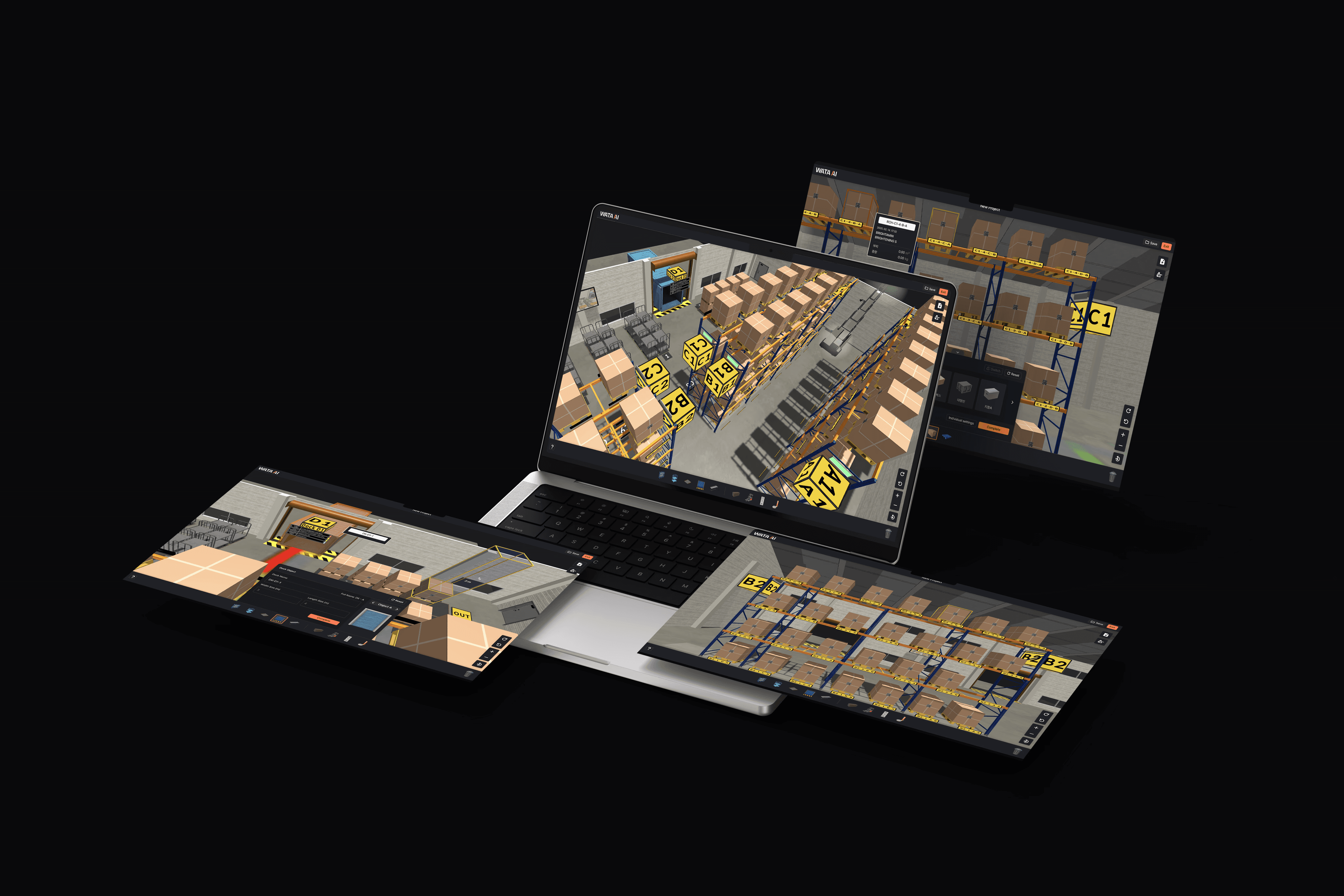
Custom designs are possible considering environments such as export and import warehouses and containers. We use various types of objects provided to specify the arrangements and options of Racks, Planes, Docks, Boxes, etc., that are actually in use. Free design within a 3D space is possible, allowing for the implementation of an environment similar to the actual warehouse you possess.

WATON View
WATON Link
WATON Maestro
WATON View

$500 / month

Basic asset provision

Effortlessly upload files by dragging and dropping them into the storage interface.

Basic asset provision

Effortlessly upload files by dragging and dropping them into the storage interface.

Logistics Center Design

Quickly find your files with our powerful in-app search functionality.

Logistics Center Design

Quickly find your files with our powerful in-app search functionality.

Asset Custom Support

Quickly find your files with our powerful in-app search functionality.

-

Asset Custom Support

Quickly find your files with our powerful in-app search functionality.

-

Multi-layer support

Explore and manage your data assets, ensuring high quality and governed data accessibility.

-

Multi-layer support

Explore and manage your data assets, ensuring high quality and governed data accessibility.

-

Waton Studio

Integration with real data

Integration with real data

Users can implement a space that integrates real data to enable digital warehouse management. By utilizing DB integration, AI Vision Kit, and IoT sensors, real-time logistics movement data is collected, and automation of tasks based on this data enhances the efficiency of workers. At the same time, it reduces unnecessary human errors, improving the accuracy and reliability of logistics operations.

twin example

Easy editing features

Easy editing features

You can customize the names and quantities of various elements, and it supports intuitive features provided by common editing tools such as copy, paste, and grouping. This allows users to minimize inefficient time for learning and quickly and efficiently build a precise warehouse simulation that closely resembles a real environment.
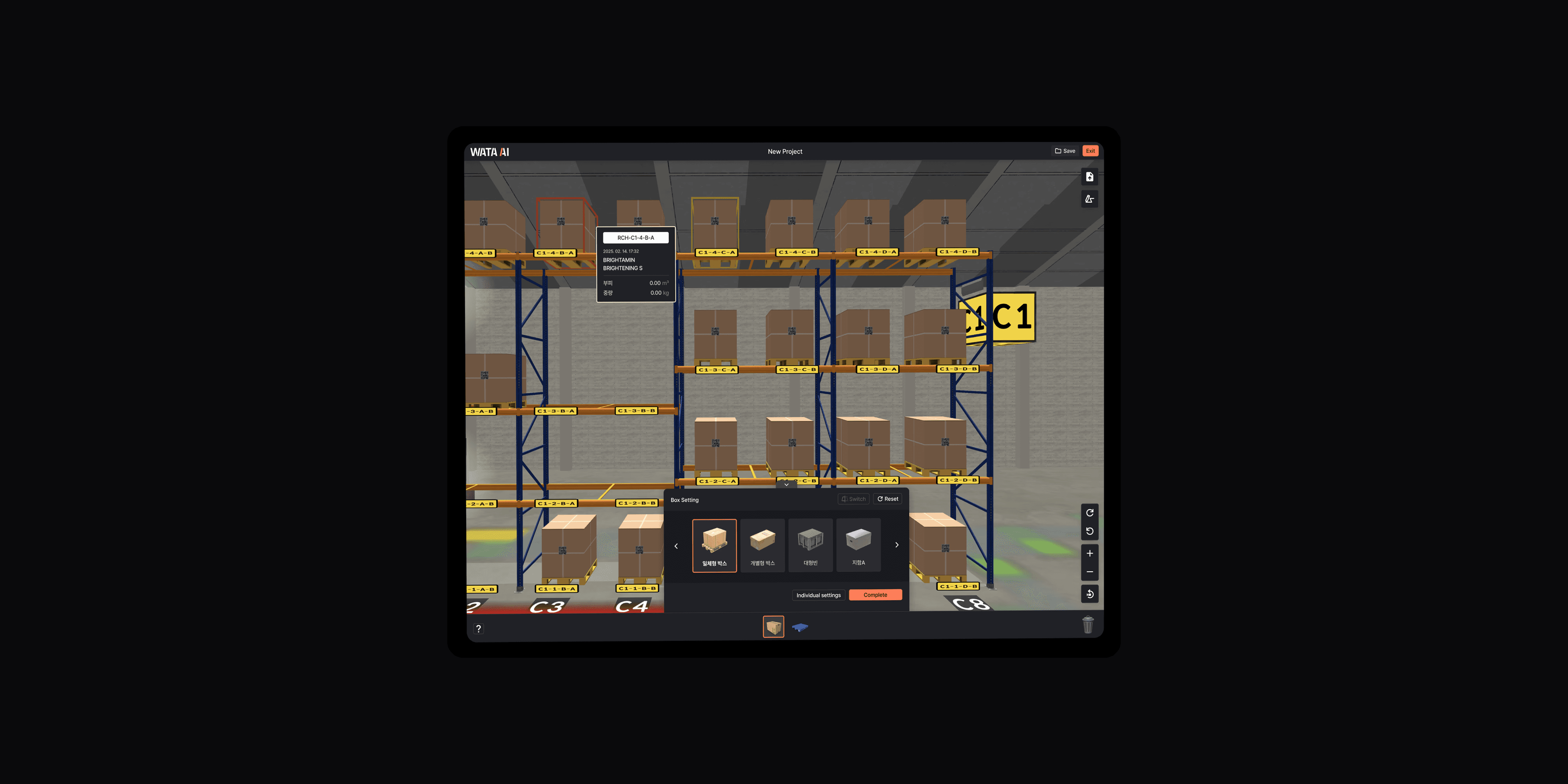
Provides editing features

Workspace support
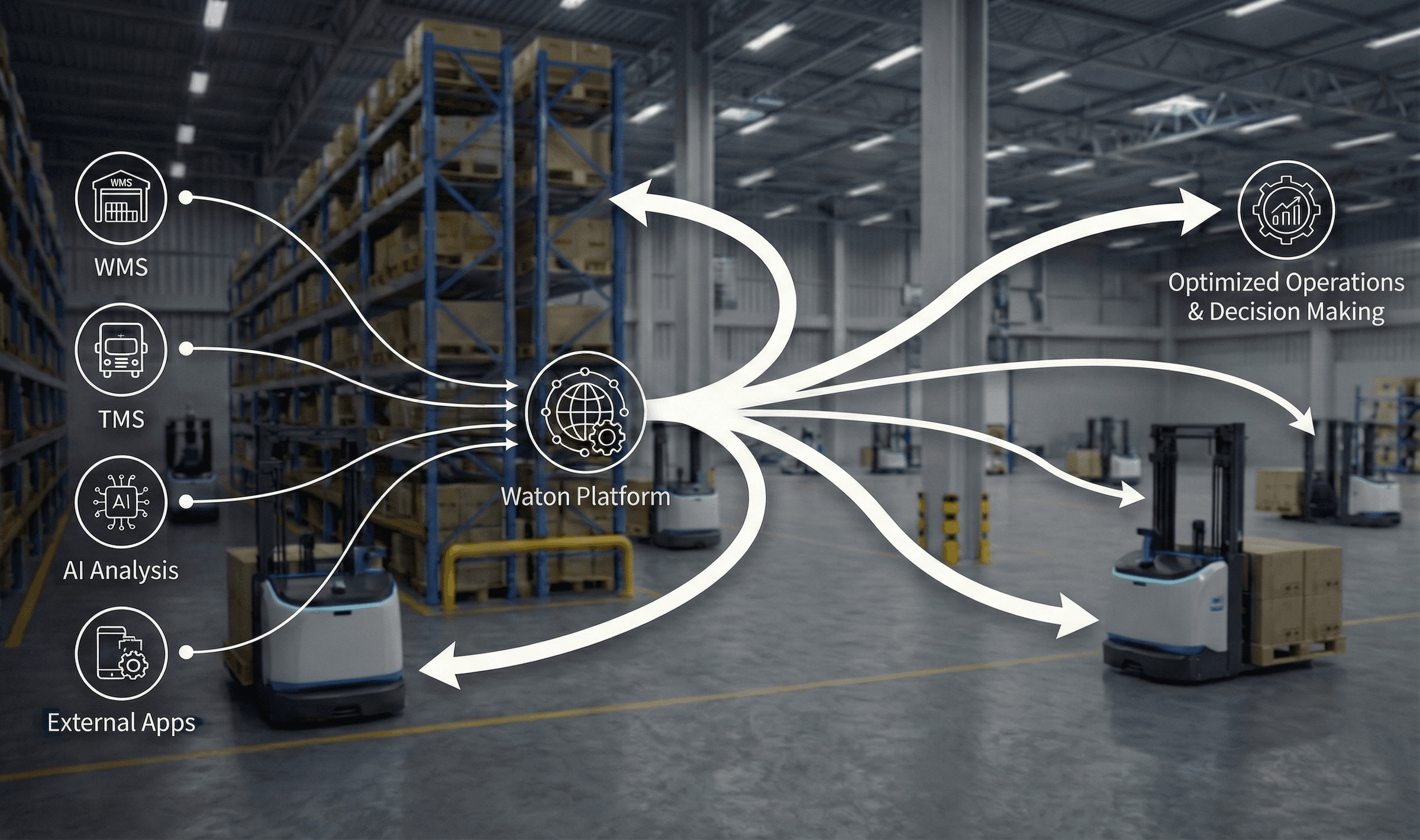
Logistics data and integration with external apps

Logistics data and integration with external apps

Data integration linkage

A digital twin workspace integrates various logistics data and external applications to provide unified information and create an efficient working environment. For example, it can visualize real-time inventory status, planned and confirmed inbound/outbound data, and the location of items in transit on the digital twin by linking with Warehouse Management Systems (WMS) or Transportation Management Systems (TMS). Additionally, by connecting with AI-based external analytical solutions for inventory forecasting and demand analysis, one can gain deep insights necessary for decision-making. Through this integration, it is possible to check and utilize dispersed information in one place, thereby maximizing transparency and efficiency in logistics operations.
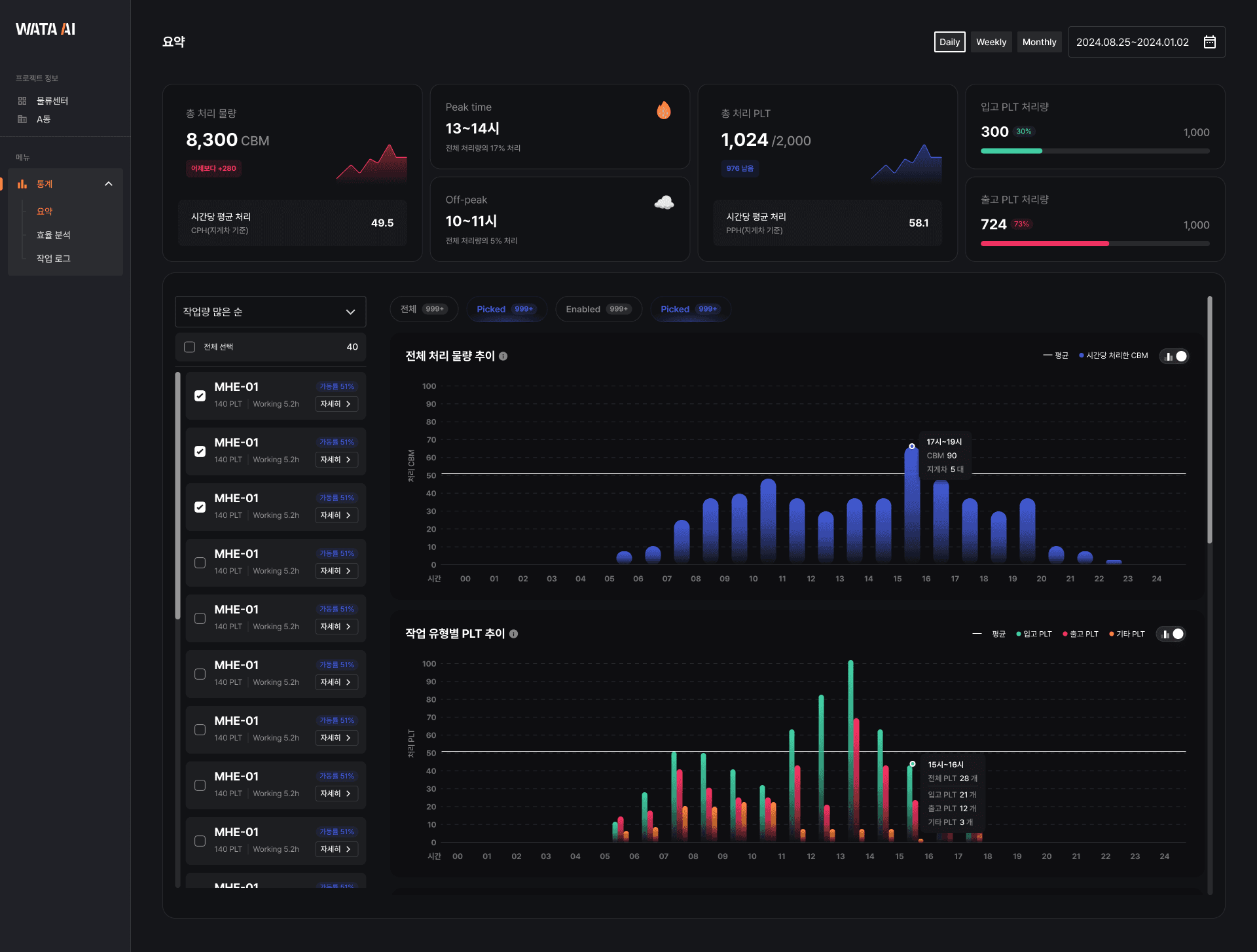
Statistics analysis and visualization by warehouse

Statistics analysis and visualization by warehouse

Statistical analysis example

This feature performs statistical analysis based on the logistics data of each warehouse and visually represents it. For example, it analyzes the hourly inbound and outbound volumes, picking operation times, space utilization, and equipment utilization rates of a specific logistics center and presents them in the form of graphs or dashboards. This allows for an intuitive understanding of the operational efficiency of each building, making it easy to identify bottlenecks or inefficient areas. Additionally, it supports strategic decision-making by predicting future trends based on historical data or reviewing the operational efficiency of various scenarios through simulations.

Permission Management

Access control for features

Access control for features

It finely controls the access rights for users to certain functions within the digital twin solution. For instance, field managers can access operational functions such as inventory modification and task order creation, but their access to administrative functions such as changing system settings or creating user accounts may be restricted. In contrast, general operators can be configured to use only the functions for checking and reporting the completion of assigned tasks. This ensures that each user utilizes only the minimum functions necessary for their work, preventing system misuse and enhancing security.

User role-based solution feature assignment

User role-based solution feature assignment

This feature assigns specific functions of the solution based on the user's role, such as field managers or workers, and provides a customized interface accordingly. For example, the 'Field Manager' role includes a dashboard with essential functions such as real-time inventory monitoring, task scheduling, and equipment status checks. The 'Worker' role provides only the minimum necessary functions for actual task execution, such as assigned picking lists, task instruction confirmations, and completion reports, reducing complexity and enhancing user-friendliness. Through this role-based function assignment, users can focus on their tasks and reduce confusion caused by unnecessary function exposure.